Articles by "Taig Jailbreak"
Showing posts with label Taig Jailbreak. Show all posts

Surprisingly vulnerabilities exploited by TaiG Jailbreak have not been fixed yet by Apple as the tool is still able to jailbreak both iOS 8.1.2 and 8.2 beta.

According to several jailbreak users, iOS 8.1.2 jailbreak is much more stable than 8.1.1.

So in case you decided to update your device to iOS 8.1.2 and jailbreak it, It is a wise decision.Before procceding with TaiG jailbreak please backup your device with iTunes and disable both Find my iPhone and pass-code features for a higher rates of successful jailbreak.

 Step One " Run TaiG Jailbreak Tools"


Step Two " Plug in your device " 


Step Three " Un-check 3K Assistant option "


Step Four "Hit Start"
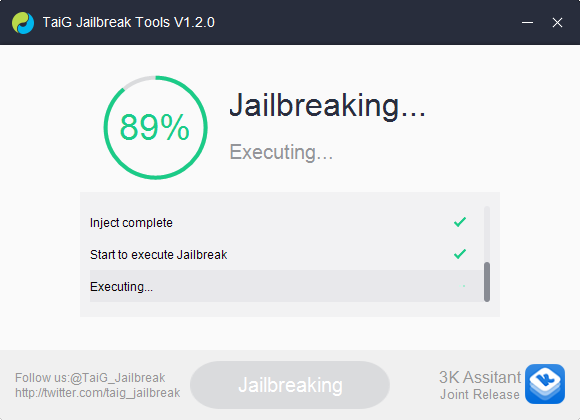

Last Step " Wait for your device to reboot and you should get "


Once you get the TaiG jailbreak successful message, make sure you install iOS 8 compatible tweaks to avoid losing the jailbreak.  

Well, if you miss the opportunity to jailbreak your device running iOS 8.1 then here is your second chance to enjoy a jailbroken device.

A Chinese team call themselves TaiG released an untethered jailbreak for both iOS 8.1.1 and 8.2 beta.

TaiG jailbreak is compatible with the following devices:


TaiG jailbreak tool can also jailbreak previous releases of iOS 8, but for safety matters, we advise you to stick to Pangu8 Jailbreak.


Before proceeding the jailbreak process please make sure you : 

* Backup your data.


* Update to iOS 8.1.1 via iTunes otherwise the TaiG jailbreak will fail.

* Disable both the Pass-code and Find my iPhone feature.


Grab TaiG Jailbreak tool from the official website :


Decompress the zip file and run it as administrator.


Once you connect the iDevice you should be able to click on the green button to proceed the Jailbreak.


In case you updated to iOS 8.1.2, here is our step by step tutorial on how to jailbreak your device using TaiG Jailbreak V1.2.0.